2011年1月17日 星期一

使用LOAD解決無法匯入含有Generated Always的表格之方法

資料來源:http://publib.boulder.ibm.com/infocenter/db2luw/v8/index.jsp?topic=/com.ibm.db2.udb.doc/core/r0008304.htm

在設計資料庫的schema時,若針對Primary Key有設定Generated Identity屬性,在load資料時,會出現無法匯入的訊息,此時可以在LOAD    command中加上 modified by identityoverride 選項,如此一來,就會把 source table的identity column的值直接覆蓋到target table的identity column。範例指令如下

db2 load from load.del of del modified by identityoverride 
replace into table1


進階資訊(其它Import/Export/Load會用到的modifier,以及Import/Export/Load對這些modifier的支援)

http://www.ibm.com/developerworks/data/library/techarticle/dm-0405melnyk/index.html

2011年1月16日 星期日

更改DB2 Server Name---透過db2nodes.cfg

執行db2指令時,系統回報這個錯誤 Error in the db2nodes.cfg file at line number "1".  Reason code "10",經過google搜尋後,發現是因為該系統是由其它系統image複製過來,因此sqllib/db2nodes.cfg的hostname設定與目前機器的hostname不符。以下紀錄解決方法

db2nodes.cfg記錄了每個DB2 partition的資訊,其內容格式如下

nodenum    hostname    logical port   netname    resourcesetname

其中nodenum, hostname及logical port為必要的三個欄位。依據(http://publib.boulder.ibm.com/infocenter/db2luw/v8/index.jsp?topic=/com.ibm.db2.udb.doc/start/r0006351.htm)的說明,nodenum為介於 0999 之間的專用號碼,可識別分割資料庫系統中的資料庫分割區伺服器;hostname為資料庫伺服器所在的Hostname;logical port為資料分割伺服器的邏輯埠號。以下為不同的配置範例

一台電腦,四個資料庫分割區伺服器

如果您不是使用叢集環境,且想讓名為 ServerA 的實體工作站有四個資料庫分割區伺服器,則可更新 db2nodes.cfg 檔,如下所示:
   0          ServerA        0
1 ServerA 1
2 ServerA 2
3 ServerA 3

兩台電腦,每台電腦有一個資料庫分割區伺服器
如果您想讓分割的資料庫系統包含兩個名為 ServerAServerB 的實體工作站,則可更新 db2nodes.cfg 檔案,如下所示:

   0          ServerA        0
1 ServerB 0

兩台電腦,每台電腦有三個資料庫分割區伺服器
如果您想讓分割的資料庫系統包含兩個名為 ServerAServerB 的實體工作站, 且讓 ServerA 執行 3 個資料庫分割區伺服器,則可更新 db2nodes.cfg 檔案,如下所示:

   4          ServerA        0
6 ServerA 1
8 ServerA 2
9 ServerB 0

兩台電腦,具有高速切換的三個資料庫分割區伺服器
如果您想讓分割的資料庫系統包含兩台名為 ServerAServerB (ServerB 執行兩個資料庫分割區伺服器) 的電腦,並且使用名為 switch1switch2 的高速交互連接,則可更新 db2nodes.cfg 檔案,如下所示:

   0          ServerA        0              switch1
1 ServerB 0 switch2
2 ServerB 1 switch2


設定完成後,執行db2stop/db2start即可。詳細說明可看(http://publib.boulder.ibm.com/infocenter/db2luw/v8/index.jsp?topic=/com.ibm.db2.udb.doc/start/r0006351.htm)


#For Windows


DB2 windows版本的db2nodes.cfg在 DB2 v8及v9.1,是放在Program Files\IBM\SQLLIB\DB2\db2nodes.cfg中;而在9.5及以上,是放在Documents and Settings\All Users\Application Data\IBM\DB2\<DB2COPY>\DB2\db2nodes.cfg中。手冊建議不要直接修改檔案內容,可透過下列指令達到修改hostname目的


    db2nchg /n:nodeNumber /h:hostName


上述指令可以修改 node的 hostName,其中,在沒有partition的環境下,nodeNumber為0。


詳細db2nchg指令用法在此。另外,可以用db2nlist最出目前資料庫有那些nodes


2011年1月14日 星期五

客制化Rational Data Architect

本文介紹如何透過操作Data Architect的Model,來延伸其Model的屬性以及功能

出處:http://www.ibm.com/developerworks/data/library/techarticle/dm-0807liu/index.html

Extend IBM InfoSphere Data Architect to meet your specific data modeling and integration requirements, Part 1: Modifying IDA models and customizing properties

Wei Liu (liuw@us.ibm.com), Software Engineer, IBM

Summary:  IBM® InfoSphere® Data Architect (IDA) (formerly Rational® Data Architect) is gaining momentum as a comprehensive tool that helps organizations promote a thorough understanding of their enterprise information architecture. As more people use IDA, there's an increasing need for some customers to extend IDA to meet their unique data modeling and integration requirements. This two-part series shows you how to extend IDA's models, properties view, model reports and validation rules. In Part 1, learn how to programmatically traverse and modify IDA models and how to add and display custom properties. [IDA Version 7.5 has adapted Data Tools Project (DTP) to replace Web Tools Project (WTP). Because IDA uses the SQL model defined in DTP as the basis of its metamodels, the section Programmatically traverse and modify RDA logical data model and physical data model, as well as the sample code provided with the article, were updated.--Ed.]

View more content in this series

Tags for this article: data_access, infosphere_data_architect, integrating_products,integration

使用Rational Data Architect來進行資料整合

本篇介紹如何使用Rational Data Architect來檢視、註解現有之data source,並且建立Mapping model來比較這些data source的差異,並且使用工具,自動產生可套用到WebSphere Information Integerator的程式

引用來源: http://www.ibm.com/developerworks/library/ar-rdaint/#resources

Use Rational Data Architect to integrate data sources

A five-step process for success

Davor Gornik (dgornik@us.ibm.com), Product Manager, IBM

Summary:  No doubt about it -- information integration is challenging. Many business decisions must be documented and many transformations must be performed. IBM Rational® Data Architect can document your decisions and automate part of this process. Read this article to explore a tool-supported process for federation design in just five steps.

2010年7月30日 星期五

WebSphere Application Server Dynamic Cache

WAS會cache servlet、WAS指令及JSP執行結果,以增進應用程式執行效能。WAS將這些cache活動,如servlet、Web servcies、WebSphere Command整合到Dynamic Cache這個服務之下。

Dynamic cahce service執行於AP server所在的JVM中,攔截servlet service的呼叫或是WAS指令的執行,將其執行結果cache起來,之後再呼叫同樣的servlet時,就可直接裝cache起來的object回傳,以增進效能。

在WAS上開啟 dynamic cache的方法如下:
1.登入WAS admin server
2.選定要設定的server後,選取Container Services下面的Dynamic Cache Service
image

2010年5月18日 星期二

設定 Rational 軟體的語系

Rational語系設定依不同版本,有不同之設定方式:

For version 6.0.x:

  • Start IBM Rational Software Development Platform executable (rationalsdp.exe) with the -nl argument followed by the language en_US (for United States English) such as:
    rationalsdp.exe -nl en_US
  • Add the variable VMArgs=-Duser.language=en into the filerationalsdp.ini under the individual VMArgs section as shown below:

    ; Add other individual VMArgs with additional VMArgs keys i.e.
    ; VMArgs=arg1
    ; VMArgs=arg2

    VMArgs=-Duser.language=en

Both rationalsdp.exe and rationalsdp.ini are located by default in:
<IBM_INSTALL_DIR>\rational\SPD\6.0
(for example, C:\Program Files\IBM\Rational\SDP\6.0)

=========================================================================

For version 7.0.x:

  • Start IBM Rational Software Delivery Platform with the -nlargument followed by the language en_US (for United States English) such as:
    RSA
    "eclipse.exe" -nl en_US -product com.ibm.rational.rsa.product.ide

    RAD
    "eclipse.exe" -nl en_US -product com.ibm.rational.rad.product.ide
    RSM
    "eclipse.exe" -nl en_US -product com.ibm.rational.rsm.product.ide
    RSD
    "eclipse.exe" -nl en_US -product com.ibm.rational.rsd.product.ide
  • Add the variable VMArgs=-Duser.language=en into the fileeclipse.ini under the VMArgs section as shown below:
    ...
    -vmargs
    -Duser.language=en
    -Xquickstart
    ...

Both eclipse.exe and eclipse.ini are located by default in:
<IBM_INSTALL_DIR>\SPD70
(for example, C:\Program Files\IBM\SDP70)

=============================================================

For version 7.5.x:

  • Start IBM Rational Software Delivery Platform with the -nlargument followed by the language en_US (for United States English) such as:
RSA
"eclipse.exe" -nl en_US -product com.ibm.rational.rsa.product.ide

RAD
"eclipse.exe" -nl en_US -product com.ibm.rational.rad.product.ide
RSM
"eclipse.exe" -nl en_US -product com.ibm.rational.rsm.product.ide
RSA SE
"eclipse.exe" -nl en_US -product com.ibm.rational.rsastd.product.v75.ide
  • Add the variable VMArgs=-Duser.language=en into the fileeclipse.ini under the VMArgs section as shown below:
...
-vmargs
-Duser.language=en
-Xquickstart
...

Both eclipse.exe and eclipse.ini are located by default in:
<IBM_INSTALL_DIR>\SPD
(for example, C:\Program Files\IBM\SDP)
  • Add osgi.nl=en to the end of the config.ini file located under <IBM_INSTALL_DIR>\SPD\configuration

Identifying v.s. Non-Identifying relation --- Rational Data Architect

在建構 Logical or Physical Data Model時,Rational Data Architect提供了下列五種不同的選項來描述 Entity 之間的關係,以下描述這五種不同關係的差異性為何

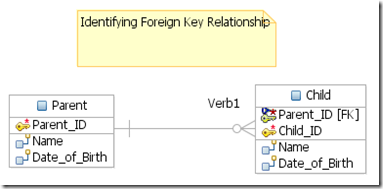
  • Identifying Foreign Key Relationship
  • Non-Identifying Mandatory Foreign Key Relationship
  • Non-Identifying One-to-One Foreign Key Relationship
  • Non-Identifying Optional Foreign Key Relasionship
  • Many-to-Many Relationship

這裡先區辨Identifying 和 Non-Identifying的差異。 在一個Identifying的關係中,父Entity 中的Primary Key會被加到子Entity中成為Foreign Key,且此Foreign Key和子Entity的原本的Primary Key會組合成該子Entity的Composite Primary Key;相反地,Non-Identifying的關係中,父Entity的Primary Key只會單純地成為子Entity的Foreign Key,而子Entity還是使用自己原本的Primary Key,而不會與來自父Entity的Foreign Key結合為Composite Primary Key。見下圖
image


image


介紹完Identifying和Non-Identifying的差異後,接下來介紹Non-Identifying這一大類的關係。Non-Identifying又可再細分為Mandatory、One-to-One及Optional 等三種關係。依照建立關聯後,加到子Entity的Foreign Key是否允許空值,可分出(Mandatory + One-to-One) 與Optional的差異。Optional的關係中,建在子Entity的Foreign Key允許有空值;而Mandatory及One-to-One不允許空值。

再來,Mandatory與One-to-One Foreign Relationship的差異在於 Foreign Key的cardinality,即One-to-One的Foreign Key允許1對1的關係(Cardinality為 零 或 1);而Mandatory的Foreign Key則為1對多的關係(Cardinality為零或無限)

最後,Many-to-Many的關係則不會在子Entity中建立任何欄位 e.g. Foreign Key,只是單純地描述兩個Entity之間有多對多的關係。它的用處比較像是在Model high level的 Logical Data Model時使用,此時尚不討論到實作的細節。最後在實作時,可能是在父Entity及子Entity之間,新建一個Entity。而父Entity與子Entity分別與此新建Entity間,存在Identifying Foreign Relationship的關係